> ## Documentation Index
> Fetch the complete documentation index at: https://developer.flabslis.com/llms.txt
> Use this file to discover all available pages before exploring further.
# Introduction
# Billing API
The Billing API enables you to create pre-bookings in the Flabs system, initiating the complete laboratory workflow from booking to report delivery.
## Billing Workflow
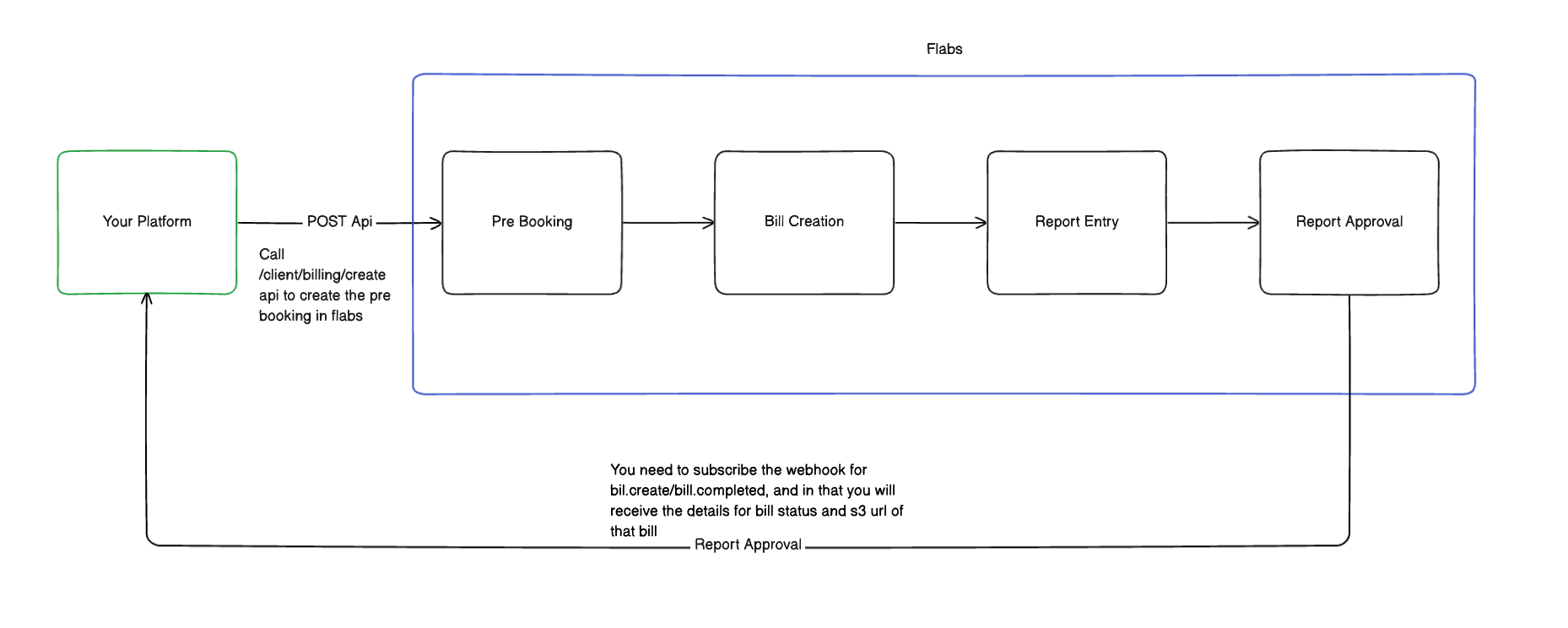
The billing process follows a structured workflow as shown below:
 ### Workflow Steps
1. **Your Platform** → **Pre Booking**: Call `/client/billing/create` API to create a pre-booking
2. **Pre Booking** → **Bill Creation**: Flabs creates a bill internally
3. **Bill Creation** → **Report Entry**: Laboratory processes samples and enters report data
4. **Report Entry** → **Report Approval**: Reports are reviewed and approved
5. **Webhook Notifications**: Receive real-time updates at each stage (if subscribed)
## Key Concepts
### Required Data
* **Patient Details**: Basic patient information (name, age, gender)
* **Integrator ID**: Your unique identifier for tracking
* **Lead Source**: Source of the booking request
* **Tests/Packages**: Either mapped (with Flabs IDs) or unmapped tests and packages
### Test and Package Mapping
* **Mapped Tests**: Tests already synchronized between your system and Flabs
* **Unmapped Tests**: Tests that need manual mapping by Flabs team
* **Mapped Packages**: Package bundles with established Flabs IDs
* **Unmapped Packages**: Package bundles requiring manual mapping
### Webhook Integration
Subscribe to webhook events to receive notifications about:
* `bill.created` - When bill is generated
* `bill.completed` - When entire bill is processed
* `report.completed` - When individual reports are ready
## Getting Started
1. **Authentication**: Obtain a Bearer token from [authentication endpoints](/auth/introduction)
2. **Create Pre-booking**: Use the [billing create endpoint](/billing/endpoint/create_bill)
3. **Subscribe to Webhooks**: Set up [webhook notifications](/webhooks/introduction) for status updates
4. **Track Progress**: Monitor bill status through webhook events
## Important Notes
* At least one of the following is required: `mapped_tests`, `unmapped_tests`,
`mapped_packages`, or `unmapped_packages` - Contact the Flabs team to add new
lead sources or get additional field information - Barcodes must be unique
across the system
Ensure all required patient details are provided. Missing information may
cause booking creation to fail.
### Workflow Steps
1. **Your Platform** → **Pre Booking**: Call `/client/billing/create` API to create a pre-booking
2. **Pre Booking** → **Bill Creation**: Flabs creates a bill internally
3. **Bill Creation** → **Report Entry**: Laboratory processes samples and enters report data
4. **Report Entry** → **Report Approval**: Reports are reviewed and approved
5. **Webhook Notifications**: Receive real-time updates at each stage (if subscribed)
## Key Concepts
### Required Data
* **Patient Details**: Basic patient information (name, age, gender)
* **Integrator ID**: Your unique identifier for tracking
* **Lead Source**: Source of the booking request
* **Tests/Packages**: Either mapped (with Flabs IDs) or unmapped tests and packages
### Test and Package Mapping
* **Mapped Tests**: Tests already synchronized between your system and Flabs
* **Unmapped Tests**: Tests that need manual mapping by Flabs team
* **Mapped Packages**: Package bundles with established Flabs IDs
* **Unmapped Packages**: Package bundles requiring manual mapping
### Webhook Integration
Subscribe to webhook events to receive notifications about:
* `bill.created` - When bill is generated
* `bill.completed` - When entire bill is processed
* `report.completed` - When individual reports are ready
## Getting Started
1. **Authentication**: Obtain a Bearer token from [authentication endpoints](/auth/introduction)
2. **Create Pre-booking**: Use the [billing create endpoint](/billing/endpoint/create_bill)
3. **Subscribe to Webhooks**: Set up [webhook notifications](/webhooks/introduction) for status updates
4. **Track Progress**: Monitor bill status through webhook events
## Important Notes
* At least one of the following is required: `mapped_tests`, `unmapped_tests`,
`mapped_packages`, or `unmapped_packages` - Contact the Flabs team to add new
lead sources or get additional field information - Barcodes must be unique
across the system
Ensure all required patient details are provided. Missing information may
cause booking creation to fail.